We use cookies to make your experience better. To comply with the new e-Privacy directive, we need to ask for your consent to set the cookies. Learn more.
OPENING TIMES: MONDAY - FRIDAY | 9AM - 5:30PM
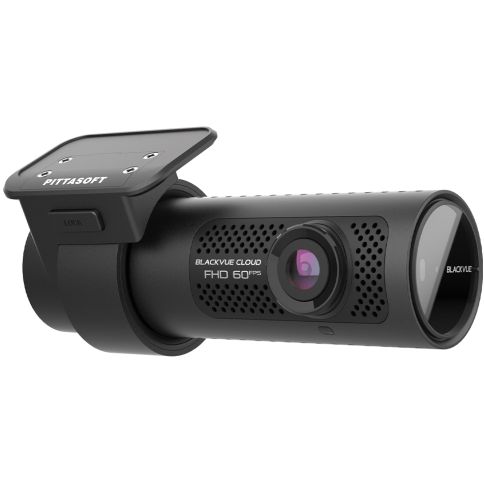
BlackVue DR750X 1 Channel Full HD Dash Cam with 32GB Built-in Wi-Fi, GPS & Parking Mode Car Camera
The DR750X-1CH represents the benchmark in the single-channel dash cam category, the choice for the power-user who demands the ultimate in terms of video quality and next-generation connected features.
With Full HD 1080p performance, the DR750X-1CH provides class-leading protection for your vehicle by recording fluid 60 frames per second video footage via an ultra-wide lens with a 139° viewing angle. A Sony STARVIS image sensor ensures the best possible image quality under any lighting conditions. Also included is GPS logging, Wi-Fi, Cloud-connectivity and impact and motion detection. All this in a stealthy compact design.
Key Features

Native Parking Mode
Hardwiring cable included
DR750X Series can be hardwired to your vehicle’s fuse panel for Parking Mode, without requiring optional accessories. The dashcam will switch to Parking Mode automatically when vehicle ignition is turned off. Voltage cutoff and timer can be set in the BlackVue App.
Parking Mode accessories support
DR750X Series is also compatible with all BlackVue Parking Mode Kits and Batteries.
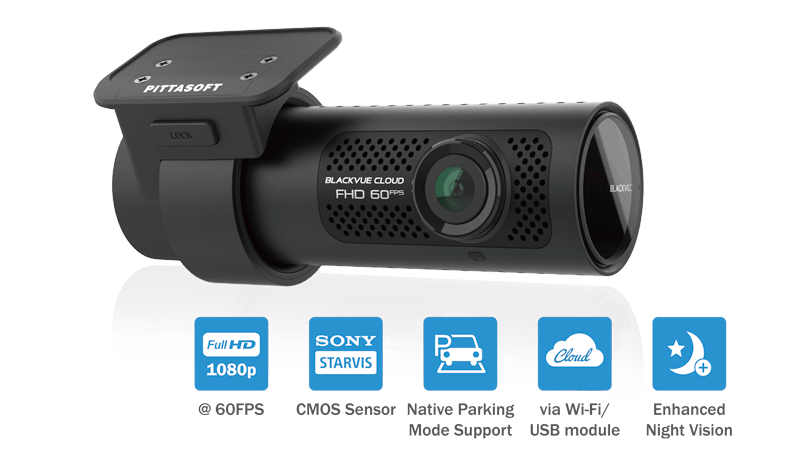
Full HD Cloud dashcam
Sony STARVIS™ sensor with Full HD 1080p at up to 60 frames per second.
Record fluid videos at a wide 139° view angle.
The STARVIS image sensor ensures that your dashcam captures critical details even in low light.
Native Parking Mode with built-in voltage monitor to protect your vehicle battery (hardwiring cable included).
With the free BlackVue Cloud service, check on your car from anywhere, anytime.
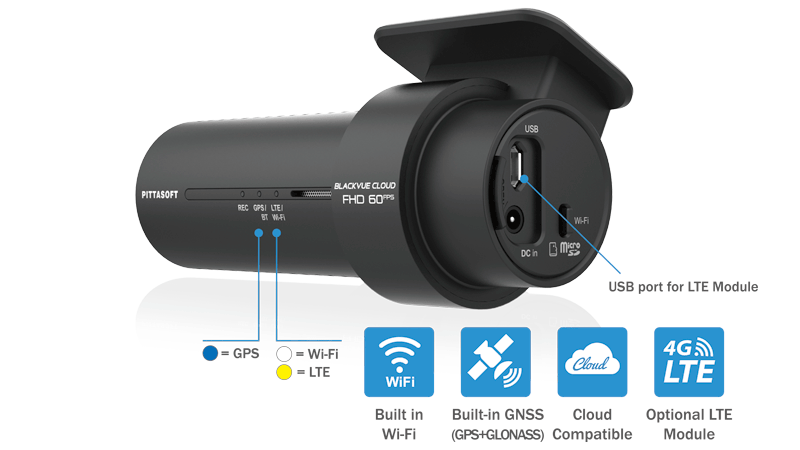
GPS, Wi-Fi and Optional LTE
GPS: visualize the location of your vehicle on the map during video playback and overlay speed on videos (can be hidden in settings).
Wi-Fi: lets you connect to your BlackVue with a smartphone or tablet. Wi-Fi also lets your BlackVue connect to BlackVue Cloud via any home or mobile Wi-Fi hotspot (router).
LTE: connect the optional LTE connectivity module* via the USB port for the best Cloud experience.
(*) SIM card not included.
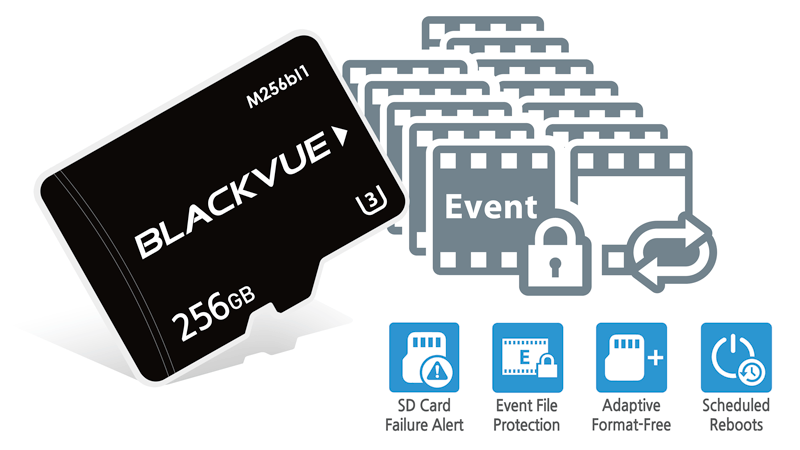
Your videos are safe
Event Files Overwrite Protection: dashcams record in a loop, overwriting older files when the memory is full. BlackVue can prevent Event files (triggered manually or by impacts) overwriting. Up to fifty (50) files can be protected this way. You can choose to allow new Event files to overwrite past Event files, thus keeping the latest fifty.
Adaptive Format-Free File Management: this BlackVue-developed file system improves recording stability and requires less microSD card formatting.
SD Card Failure Alert: your BlackVue detects as soon as the microSD card fails and warns you with a “Please check SD card” voice alert.

Built-in Impact & Motion Detection
While driving, your BlackVue detects impacts and sudden changes in speed. While parked, it also detects movements*.
Use the filters in the BlackVue App and Viewer
All videos are tagged (Normal, Event, Parking Mode motion or time lapse), so that you can easily find the relevant ones in the BlackVue Viewer for Windows and Mac OS or the BlackVue App for Android and iOS.
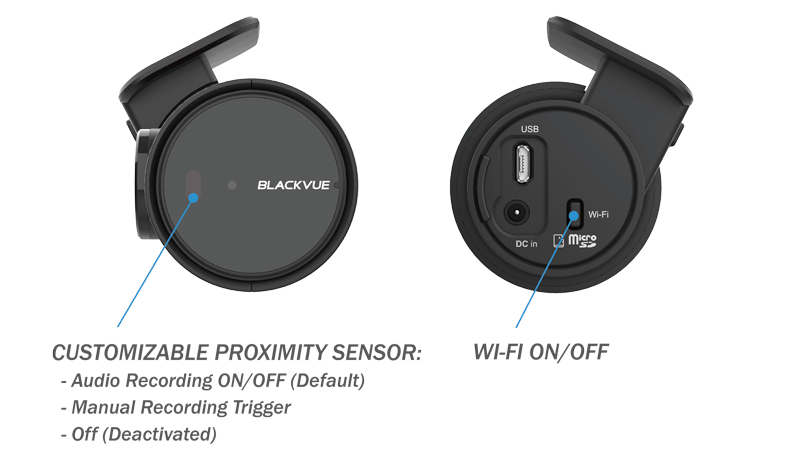
Sleek Interface
Toggle audio recording ON and OFF by simply waving your hand in front of it. The sensor can also be configured to trigger Manual Event videos in the settings.
Wi-Fi button
Turn Wi-Fi ON/OFF with the push of a button. All actions are confirmed by a voice prompt.
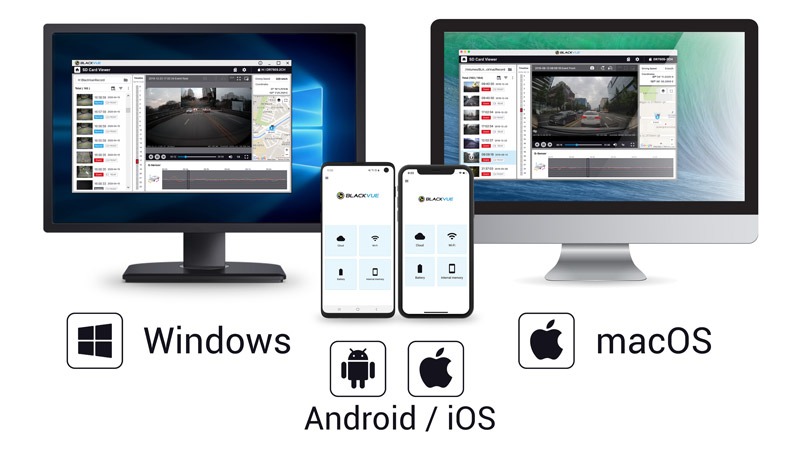
Manage Videos Easily with the BlackVue App and Viewer
The BlackVue App (iOS/Android) and Viewer (Windows/Mac OS) are free to download and use.
Both allow you to change settings and review videos sorted by time and type (Normal/Event/Parking).
With the BlackVue App, connect via Wi-Fi to your dashcam to retrieve videos on the spot.

BlackVue Cloud
Connect to your BlackVue anytime, from anywhere in the world with BlackVue Cloud.
Enjoy remote Live View and Push Notifications to your phone.
Back up important videos to the Cloud remotely.
Play and download videos from your dashcam’s memory or the Cloud from anywhere.
Check the BlackVue Cloud page for more information.
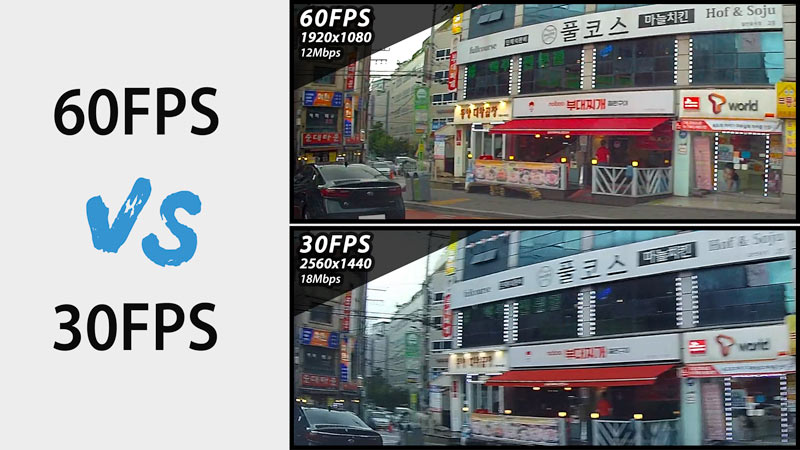
High Frame Rate for Extra Fluidity
The advantage of 60FPS video capture
The camera records extra fluid videos at 60 frames per second, keeping all details sharp even in fast action. With 60fps, motion blur is much reduced compared to 30fps. That means your BlackVue can better capture details–like license plates–even in fast-moving objects.
Note 1: the higher the image quality setting, the higher the bitrate and the bigger the file size. A bigger size will increase the time necessary to transfer a video file over Wi-Fi.
Note 2: Remote Live View using BlackVue Cloud is not affected by the image quality and framerate settings.
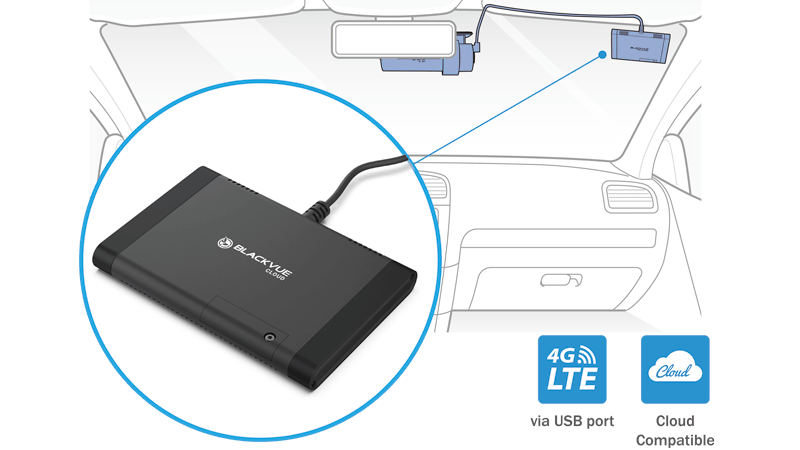
LTE Connectivity Module (Optional)
The CM100LTE connects to your compatible BlackVue X Series dashcam to provide easy 4G LTE connectivity. All you need is a valid Nano SIM card. The CM100LTE connects via the USB port of your dashcam. Your BlackVue powers the module and automatically accesses the Cloud when the module is plugged in.
Note: when purchasing, make sure the CM100LTE you choose is compatible with your mobile carrier’s network. Not compatible with DR590X Series.
What’s in the box
| Description | BlackVue DR750X 1 Channel Full HD Dash Cam with 32GB Built-in Wi-Fi, GPS & Parking Mode Car Camera The DR750X-1CH represents the benchmark in the single-channel dash cam category, the choice for the power-user who demands the ultimate in terms of video quality and next-generation connected features. With Full HD 1080p performance, the DR750X-1CH provides class-leading protection for your vehicle by recording fluid 60 frames per second video footage via an ultra-wide lens with a 139° viewing angle. A Sony STARVIS image sensor ensures the best possible image quality under any lighting conditions. Also included is GPS logging, Wi-Fi, Cloud-connectivity and impact and motion detection. All this in a stealthy compact design. Key Features
Native Parking Mode Hardwiring cable included Parking Mode accessories support
Full HD Cloud dashcam Sony STARVIS™ sensor with Full HD 1080p at up to 60 frames per second. Native Parking Mode with built-in voltage monitor to protect your vehicle battery (hardwiring cable included). With the free BlackVue Cloud service, check on your car from anywhere, anytime.
GPS, Wi-Fi and Optional LTE GPS: visualize the location of your vehicle on the map during video playback and overlay speed on videos (can be hidden in settings). Wi-Fi: lets you connect to your BlackVue with a smartphone or tablet. Wi-Fi also lets your BlackVue connect to BlackVue Cloud via any home or mobile Wi-Fi hotspot (router). LTE: connect the optional LTE connectivity module* via the USB port for the best Cloud experience. (*) SIM card not included.
Your videos are safe Event Files Overwrite Protection: dashcams record in a loop, overwriting older files when the memory is full. BlackVue can prevent Event files (triggered manually or by impacts) overwriting. Up to fifty (50) files can be protected this way. You can choose to allow new Event files to overwrite past Event files, thus keeping the latest fifty. Adaptive Format-Free File Management: this BlackVue-developed file system improves recording stability and requires less microSD card formatting. SD Card Failure Alert: your BlackVue detects as soon as the microSD card fails and warns you with a “Please check SD card” voice alert.
Built-in Impact & Motion Detection Use the filters in the BlackVue App and Viewer
Sleek Interface Wi-Fi button
Manage Videos Easily with the BlackVue App and Viewer The BlackVue App (iOS/Android) and Viewer (Windows/Mac OS) are free to download and use.
BlackVue Cloud Enjoy remote Live View and Push Notifications to your phone.
High Frame Rate for Extra Fluidity The camera records extra fluid videos at 60 frames per second, keeping all details sharp even in fast action. With 60fps, motion blur is much reduced compared to 30fps. That means your BlackVue can better capture details–like license plates–even in fast-moving objects. Note 1: the higher the image quality setting, the higher the bitrate and the bigger the file size. A bigger size will increase the time necessary to transfer a video file over Wi-Fi.
LTE Connectivity Module (Optional) The CM100LTE connects to your compatible BlackVue X Series dashcam to provide easy 4G LTE connectivity. All you need is a valid Nano SIM card. The CM100LTE connects via the USB port of your dashcam. Your BlackVue powers the module and automatically accesses the Cloud when the module is plugged in. Note: when purchasing, make sure the CM100LTE you choose is compatible with your mobile carrier’s network. Not compatible with DR590X Series. What’s in the box
|
|---|